 MCP Tools
VulpineOS provides a Model Context Protocol (MCP) server that exposes browser automation as tool calls. Each AI browser agent uses these tools to browse, and every action routes through the selected Vulpine browser context.
./vulpineos mcpAvailable Tools (38)
Core Browser Control
| Tool | Description |
|---|---|
vulpine_navigate | Navigate a session to a URL |
vulpine_snapshot | Token-optimized semantic DOM with @ref identifiers |
vulpine_click | Click at page coordinates |
vulpine_type | Type into the focused element |
vulpine_screenshot | Capture a base64 PNG screenshot |
vulpine_scroll | Scroll by pixel delta |
vulpine_scroll_into_view | Scroll a selector or ref into view |
vulpine_new_context | Create an isolated browser context and page |
vulpine_close_context | Close a browser context |
vulpine_get_ax_tree | Read the injection-filtered accessibility tree |
vulpine_click_ref | Click by @ref from vulpine_snapshot |
vulpine_type_ref | Focus and type by @ref |
vulpine_hover_ref | Hover by @ref |
vulpine_element_status | Inspect visibility, enabled state, text, and geometry for a selector or ref |
vulpine_snapshot is the primary page-reading tool. It returns compressed DOM with element refs:
{
  "name": "vulpine_snapshot",
  "arguments": { "sessionId": "sess-1", "viewportOnly": true }
}{"v":1,"title":"Example","url":"https://example.com","nodes":[
[0,"doc","Example"],
[1,"a","Home",{"hr":"/"},"@0"],
[1,"btn","Sign Up",null,"@1"]
]}Coordinate actions are available when the agent already has a precise point:
{ "name": "vulpine_click", "arguments": { "sessionId": "sess-1", "x": 640, "y": 420 } }Ref-based actions are preferred when a snapshot has returned @ref handles:
{ "name": "vulpine_click_ref", "arguments": { "sessionId": "sess-1", "ref": "@1" } }{ "name": "vulpine_type_ref", "arguments": { "sessionId": "sess-1", "ref": "@2", "text": "hello@example.com" } }Reliability And Interaction
| Tool | Description |
|---|---|
vulpine_wait | Wait for an element, text, network idle, stable DOM, or URL substring |
vulpine_find | Search interactive elements by text, label, placeholder, or role |
vulpine_verify | Check state after an action: exists, visible, checked, value, text, URL, title |
vulpine_screenshot_diff | Compare screenshot checkpoints for visual changes |
vulpine_page_settled | Wait for ready state, DOM stability, and pending images |
vulpine_select_option | Select dropdown options by value or visible text |
vulpine_fill_form | Fill multiple form fields in one call |
vulpine_page_info | Summarize page URL, title, scroll, forms, buttons, links, and modals |
vulpine_press_key | Press keys and shortcuts with modifiers |
vulpine_clear_input | Clear focused or selected input text |
vulpine_get_form_errors | Extract HTML5, CSS, and ARIA form validation errors |
Wait before acting, then verify the result:
{ "name": "vulpine_wait", "arguments": { "sessionId": "sess-1", "condition": "element", "selector": "button[type='submit']", "timeout": 10 } }{ "name": "vulpine_verify", "arguments": { "sessionId": "sess-1", "check": "url", "expected": "/dashboard" } }Use vulpine_find when a snapshot is not enough:
{ "name": "vulpine_find", "arguments": { "sessionId": "sess-1", "query": "Continue", "role": "button", "maxResults": 3 } }Use screenshot checkpoints to confirm an interaction changed the page:
{ "name": "vulpine_screenshot_diff", "arguments": { "sessionId": "sess-1", "label": "before_submit" } }{ "name": "vulpine_screenshot_diff", "arguments": { "sessionId": "sess-1", "label": "after_submit" } }Fill and validate forms without spending extra LLM turns:
{
  "name": "vulpine_fill_form",
  "arguments": {
    "sessionId": "sess-1",
    "fields": {
      "input[name='email']": "hello@example.com",
      "input[name='name']": "Elliot"
    }
  }
}
{ "name": "vulpine_select_option", "arguments": { "sessionId": "sess-1", "selector": "select[name='plan']", "value": "pro" } }{ "name": "vulpine_get_form_errors", "arguments": { "sessionId": "sess-1", "selector": "form" } }Human Realism
| Tool | Description |
|---|---|
vulpine_human_click | Move and click with natural timing, curves, and jitter |
vulpine_human_type | Type with variable human-like cadence |
vulpine_human_scroll | Scroll with inertial timing |
Human-realism tools are useful when the task should look less mechanical:
{ "name": "vulpine_human_click", "arguments": { "sessionId": "sess-1", "x": 540, "y": 310, "speed": "normal" } }{ "name": "vulpine_human_type", "arguments": { "sessionId": "sess-1", "text": "natural text entry", "wpm": 55 } }Extension Surfaces
These tools expose stable VulpineOS feature surfaces. Open-source builds return graceful unavailable errors when a provider is not present; provider-enabled builds can attach implementations behind the same public tool names.
| Tool | Description |
|---|---|
vulpine_annotated_screenshot | Screenshot with durable @N labels for interactive elements |
vulpine_click_label | Click an element from the latest annotated screenshot by label |
vulpine_get_credential | Return stored credential metadata for a site, never plaintext |
vulpine_autofill | Ask the credential provider to fill username and password fields |
vulpine_start_audio_capture | Start an audio capture session |
vulpine_stop_audio_capture | Stop an audio capture session |
vulpine_read_audio_chunk | Read base64 audio bytes from a capture session |
vulpine_list_mobile_devices | List mobile devices visible to the bridge provider |
vulpine_connect_mobile_device | Start a local CDP bridge to an Android device and return an endpoint |
vulpine_disconnect_mobile_device | Stop a mobile bridge session |
Annotated screenshots pair a PNG with a structured element list. The labels can be clicked later without re-solving coordinates:
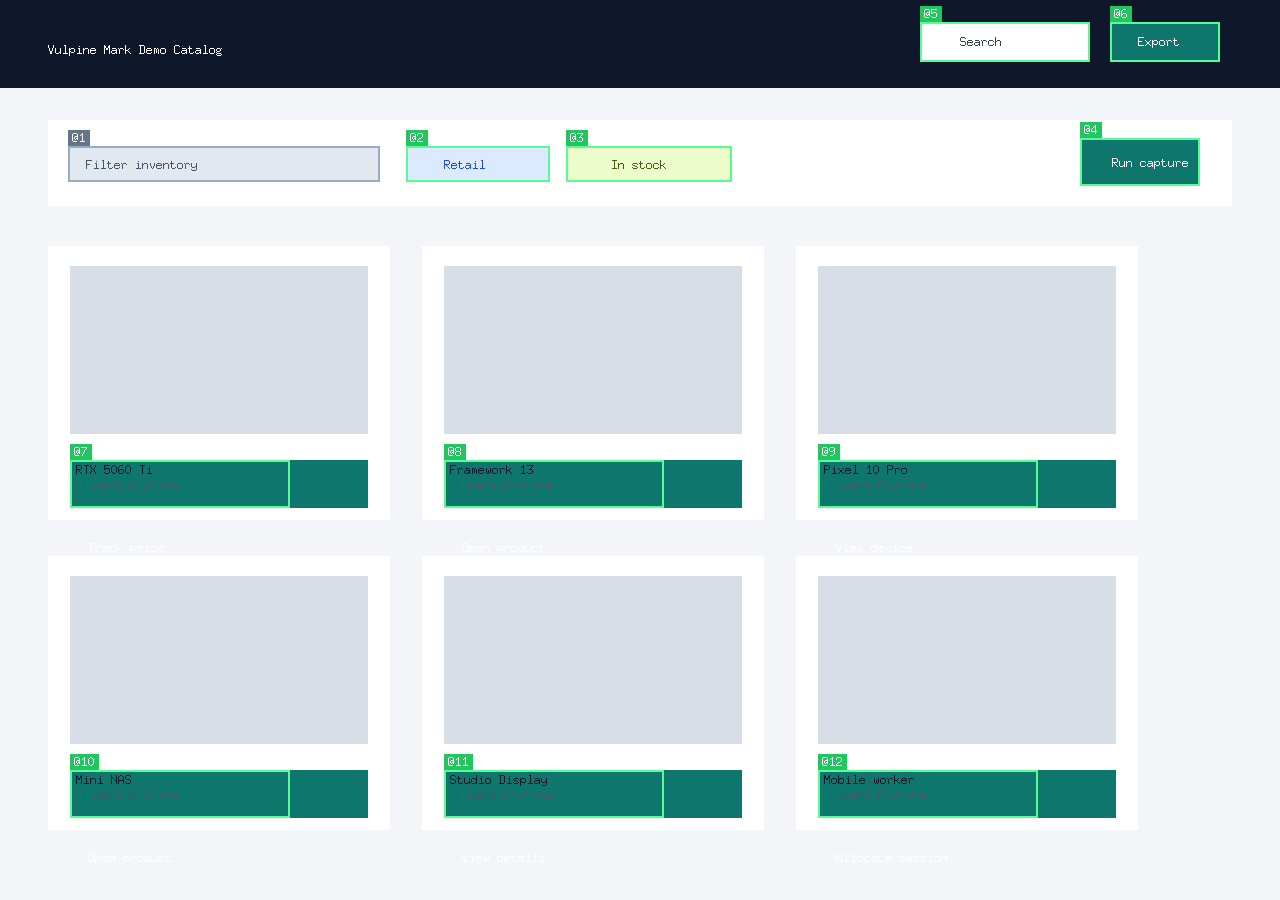
{ "name": "vulpine_annotated_screenshot", "arguments": { "sessionId": "sess-1", "format": "png", "maxElements": 80 } }{ "name": "vulpine_click_label", "arguments": { "session_id": "sess-1", "label": "@7" } }Credential tools never return plaintext passwords. Public builds return an unavailable error when no credential provider is registered:
{ "name": "vulpine_get_credential", "arguments": { "site_url": "https://example.com/login" } }{
"name": "vulpine_autofill",
"arguments": {
"site_url": "https://example.com/login",
"page_id": "sess-1",
"username_selector": "input[name='email']",
"password_selector": "input[name='password']"
}
}Audio tools use capture handles:
{ "name": "vulpine_start_audio_capture", "arguments": { "format": "wav", "sample_rate": 48000, "channels": 2 } }{ "name": "vulpine_read_audio_chunk", "arguments": { "handle_id": "audio-1", "max_bytes": 65536 } }{ "name": "vulpine_stop_audio_capture", "arguments": { "handle_id": "audio-1" } }Mobile bridge tools expose Android bridge sessions in open-source builds and can share the same public API surface with other provider-enabled deployments:
{
  "name": "vulpine_list_mobile_devices",
  "arguments": {}
}
{
"name": "vulpine_connect_mobile_device",
"arguments": { "udid": "R58N12ABCDE" }
}{
"name": "vulpine_disconnect_mobile_device",
"arguments": { "session_id": "mobile-1" }
}Ref-Based Workflow
The recommended agent workflow:
- Call
vulpine_snapshotto get the page DOM with@refidentifiers - Agent reads the snapshot and decides which element to interact with
- Call
vulpine_click_reforvulpine_type_refwith the@ref— no coordinates needed - Call
vulpine_snapshotagain to see the result
This is more reliable than coordinate-based clicking because refs resolve to the actual DOM element, scroll it into view, and compute the center point automatically.
Loop Detection
The MCP server tracks repeated identical tool calls. After repeated no-progress calls, it returns a warning telling the agent to reassess with vulpine_find, vulpine_verify, or vulpine_page_info. Navigation resets the loop history.
Agent Runtime Integration
VulpineOS prepares a local agent workspace and routes browser work through its MCP/Juggler tools. Foxbridge can also expose a CDP endpoint for compatible clients that expect a Chrome DevTools Protocol URL:
{
  "browser": {
    "enabled": true,
    "cdpUrl": "ws://localhost:9222"
  }
}
See also
- Getting Started — install and launch your first agent
- Token-Optimized DOM Export — compressed snapshots for LLM context
- Foxbridge CDP Proxy — embedded CDP server for compatible clients
- Agent Scripting DSL — JSON automation without LLM calls